
Type any text and watch it converted to real-time blinking light flashes — short flashes for dots, long flashes for dashes. Ideal for visual Morse learning, hearing-impaired users, silent environments, and SOS signal practice. No signup required.
Unlike basic Morse code converters, this Morse Machine focuses on accuracy, timing, practice, and performance tracking, making it ideal for anyone who wants to truly understand and master Morse code.
Light flash + word = signal
The Morse Code Light Translator is a free visual Morse code tool on InMorseCode.com that converts typed text into real-time blinking light signals. Instead of — or alongside — audio tones, each dot and dash in your Morse message is displayed as a flash of light on screen, giving you a completely visual way to read, learn, and practise Morse code.
The tool works by translating your text into International Morse code and then firing a circular light bulb display on screen that flashes each signal in the correct timing sequence. A short flash represents a dot (·) — one unit of time. A long, sustained flash represents a dash (—) — three units of time. The DOT and DASH indicator labels below the bulb illuminate as each signal plays, so you always know which type of flash you are seeing.
This is exactly how Morse code was historically transmitted using signal lamps, lighthouse beacons, and naval flashing-light systems — and how it can still be sent today with a flashlight or phone torch in an emergency.
The Morse Code Light Translator has three core use cases that make it unique among online Morse tools. First, it is the ideal tool for deaf and hard-of-hearing users who want to learn or practise Morse code without any reliance on audio. Second, it is essential for anyone learning visual Morse recognition — training your eye to read dot-dash light patterns the same way radio operators train their ears to hear them. Third, it is a practical SOS signal simulator — type SOS, press play, and watch the three-dot three-dash three-dot emergency signal flash exactly as it should appear in a real distress situation.
You can run the light display silently or combine it with the Sound On toggle to hear CW audio tones at the same time as the flashes. The Speed slider lets you control exactly how fast the flashes appear — slow them down to study each signal individually, or speed them up to simulate authentic Morse transmission rates.
Key advantage: Most Morse code tools are audio-first. This tool is light-first — the visual flash display is the primary output, making it the only tool on InMorseCode.com specifically designed for visual Morse learning and accessible communication.
Plain-English walkthrough of every element visible in the tool — from the text input to the speed slider — based exactly on the tool interface.
The top section of the tool is the Morse code input area where you directly place or paste the Morse code message you want to convert into flashing light signals. Instead of converting text, this tool works with Morse code that is already written in dots (.) and dashes (–).
You can enter any valid International Morse code sequence using dots, dashes, and spaces to separate letters or words. Once the Morse code is placed in the input field, simply press Play Light to convert the Morse pattern into visual light flashes that follow the exact timing rules of Morse signaling.
This makes the tool useful for learning Morse timing, practicing visual signaling, or demonstrating how Morse messages appear when transmitted as flashing light signals. For example, you can paste the Morse pattern for SOS (… — …) to instantly see the classic distress signal displayed as light flashes.
The Morse Machine offers multiple input methods to support different learning styles.
The large circular light bulb in the centre of the tool is the main visual output. When you press Play Morse, this circle flashes in the Morse code pattern of your typed message. Each character in your text triggers a sequence of flashes that match its exact Morse code pattern:
This is exactly how Morse code appears when sent by a flashlight, signal lamp, lighthouse, or naval signal torch in real-world use.
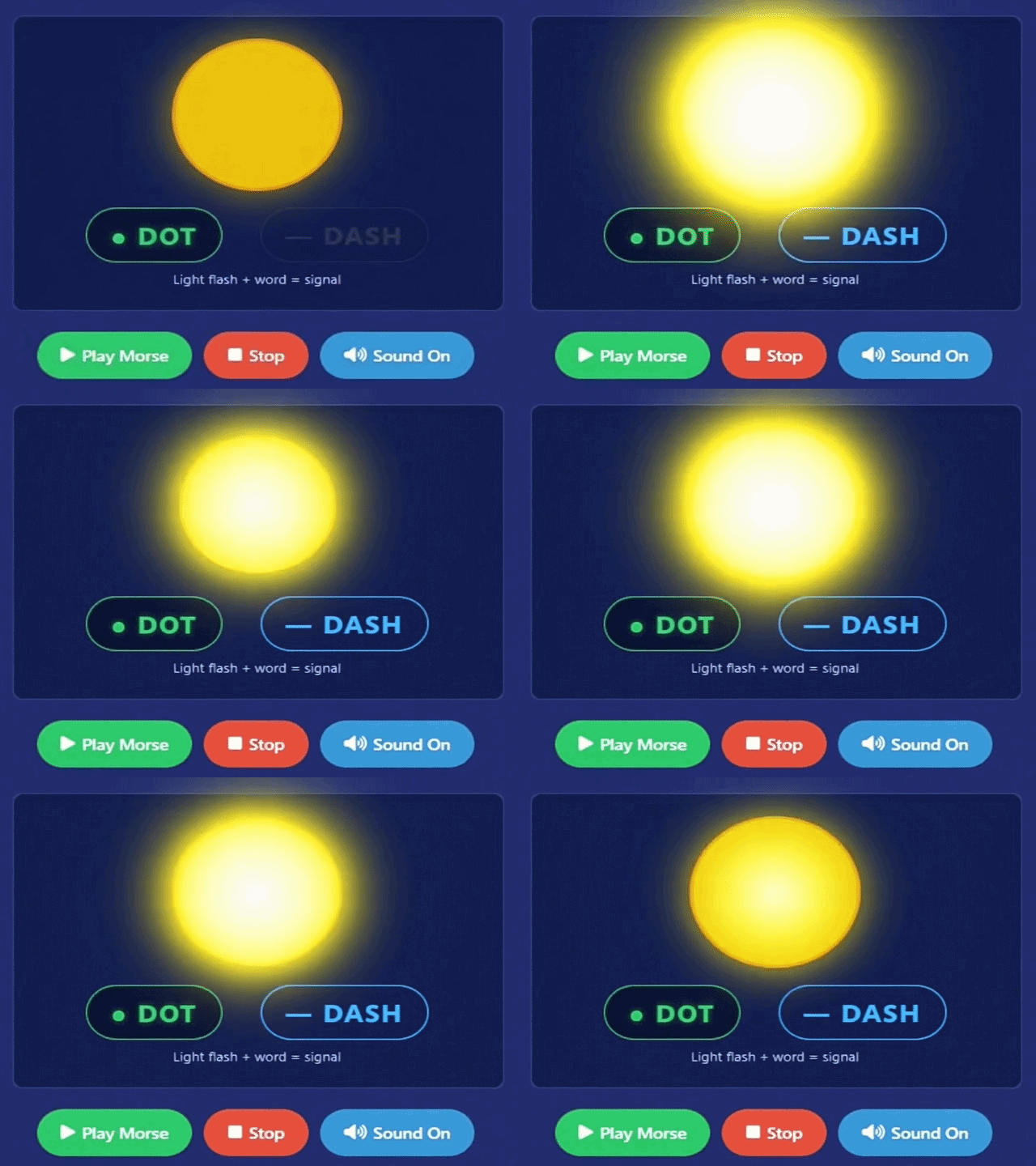
Directly below the circular light bulb are two indicator labels: ● DOT and — DASH. These labels illuminate or activate in sync with the flash currently being displayed, so you always have a clear text label telling you whether the current light signal is a dot or a dash — especially useful when signals are fast and hard to distinguish visually by duration alone.
Below these labels is the caption “Light flash + word = signal” — a reminder that in light-based Morse communication, each flash of light combined with its timing pattern is the signal unit. Understanding this relationship is the foundation of reading Morse code visually from any light source.
The green ▶ Play Morse button starts the entire light flash sequence for your typed message. The circular bulb begins flashing each character of your Morse code in real time — dots as short flashes, dashes as long flashes — from the first character to the last, following correct ITU Morse code timing rules.
Once you press Play Morse, watch the DOT and DASH indicator labels illuminate as each signal type fires. The tool proceeds through every character in your message automatically. For longer messages, the complete flash sequence plays from start to finish — adjust the Speed slider before pressing play to get the timing that works best for your purpose.
The red ⏹ Stop button halts the light flash sequence immediately and resets the tool to the beginning of the message. The circular bulb goes dark and all playback ceases. Use Stop when you want to:
The 🔊 Sound On button toggles audio output. When active (Sound On), the tool plays CW (Continuous Wave) audio beep tones in perfect synchronisation with every light flash — each dot plays as a short beep and each dash as a longer beep, overlaid on the visual flash at the same instant.
This dual audio-visual mode is one of the most powerful ways to learn Morse code — your eye sees the flash pattern at exactly the same moment your ear hears the tone pattern. Research in Morse code training consistently shows that combining visual and audio feedback accelerates pattern recognition significantly. When you want a fully silent, light-only experience — for classrooms, quiet environments, or accessibility purposes — click the button again to switch to Sound Off and run the flash sequence with no audio whatsoever.
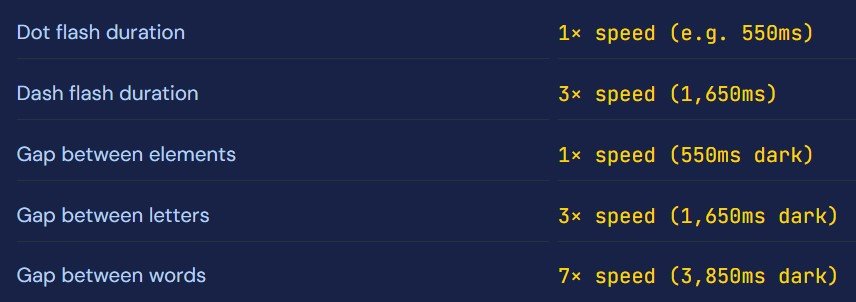
The Speed (slow → fast) slider at the bottom of the tool controls the duration of each individual dot flash in milliseconds (ms). The default is 550 ms. This single number determines all other timing in the display, because all Morse code timing is calculated as a multiple of the dot duration:
Move the slider left to increase flash duration. At slow speeds (800ms–1200ms+) each dot and dash is clearly visible and easy to distinguish. Best for beginners learning to identify individual letters and for analysing complex character sequences step by step.
Move the slider right to decrease flash duration. At fast speeds (200ms–400ms) the flashes simulate real-world Morse transmission rates used by amateur radio operators and signal lamps. Best for advanced learners building real-speed visual recognition.
Quickest workflow: Type your message in the text box → press ▶ Play Morse → watch the circular bulb flash each dot and dash → observe the DOT / DASH indicators below it. Adjust Speed left for slower analysis or right for real-time pace. Toggle Sound On to add audio tones to the visual flashes.
Morse code with light works on the same principle as Morse code with sound — the difference is the medium. Instead of short and long beeps, the transmitter flashes a light source: short flash = dot, long flash = dash. The timing ratios between flashes are exactly the same as in audio Morse, meaning anyone who can read audio Morse can read light Morse and vice versa.
The fundamental unit is the dot duration — one unit of time. Everything else is calculated from this. A dash lasts 3 units. The gap between dots and dashes within one letter is 1 unit of darkness. The gap between two letters is 3 units of darkness. The gap between two words is 7 units of darkness. This is the ITU International Morse code timing standard — the same rules used globally by amateur radio operators, maritime signal lamps, and aviation beacon identification.Russian Morse code is a variant of the internationally recognized Morse code system specifically adapted for the Cyrillic alphabet used in the Russian language. Standard International Morse code was designed around the 26-letter Latin alphabet. Because Russian uses 33 distinct Cyrillic characters — including letters like Ж, Ц, Ш, Щ, Ъ, Ы, Ь, Э, Ю, and Я that have no Latin equivalent — a separate dot-dash mapping system was developed to accommodate them.
In Russian Morse code, every Cyrillic letter is assigned a unique sequence of dots (short signals, called “dits”) and dashes (long signals, called “dahs”). For example, the letter А is ·—, Б is —···, Ж (Zhe) is ···—, and Ц (Tse) is —·—·. The letters Е and Ё share the same Morse code sequence ·, as is common practice. Digits 0–9 follow the same international dot-dash patterns used globally.
Example — SOS in light:
S = · · · → three short flashes
O = — — — → three long flashes
S = · · · → three short flashes
The world’s most recognisable emergency signal — three short, three long, three short.
Historically, light-based Morse communication was essential in situations where radio silence was required or where wireless equipment was unavailable. Naval vessels used Aldis signal lamps to communicate ship-to-ship and ship-to-shore in Morse code using visible light. Lighthouses used coded flash patterns to identify their location to passing ships. Military forces used signal torches for covert communications. Scouts and outdoor expeditions used flashlights for camp-to-camp signalling.
Today, light-based Morse remains relevant as a backup communication method, an accessibility tool for the deaf and hard-of-hearing community, a STEM education resource for schools and coding programmes, and a practical survival skill that anyone can learn with nothing more than a flashlight and knowledge of the basic alphabet. This translator brings that same visual communication system to any screen, anywhere.
For most people, the fastest way to learn visual Morse recognition is to start at a very slow speed (800ms+), focus on just 5 letters at a time (start with E, T, A, N, I), and practise until you can identify each flash pattern without counting. Then gradually increase speed using the slider.
This tool is specifically valuable for deaf and hard-of-hearing users who cannot rely on audio-based Morse code learning. The light translator provides a fully visual, fully accessible Morse code experience — no audio needed at any point. Learn the complete Morse alphabet, practise SOS and common words, and develop real visual Morse recognition skills entirely through light.
Beginners learning Morse code benefit enormously from seeing the dot-dash patterns as flashes of light. The visual representation reinforces the timing structure — you can actually see that a dash is exactly three times longer than a dot. Set a slow speed, type one letter at a time, and train your eye to recognise patterns before increasing to normal speed.
The light translator is perfect for silent classroom demonstrations — project the flash display on a screen and have students identify letters from the light pattern without sound. Use it in STEM classes to teach binary signalling, timing patterns, and the history of telecommunications. The visual output makes Morse code tangible and engaging for all learning styles.
SOS sent by light is one of the most effective silent distress signals in existence — recognisable by trained emergency responders worldwide. Use this tool to memorise the SOS pattern (· · · — — — · · ·) so you can reproduce it accurately from memory with any light source when it matters. Every prepared person should know this signal.
Note: Hiragana and Katakana represent identical sounds, so they always produce identical Wabun output. あ and ア both encode to -·-··. Only your selected input mode needs to match the characters you are typing — the Wabun result will be the same either way.
Every letter and digit encoded in the tool. Practise identifying these patterns visually using the light translator — type each character individually and set a slow speed to see its flash pattern clearly.
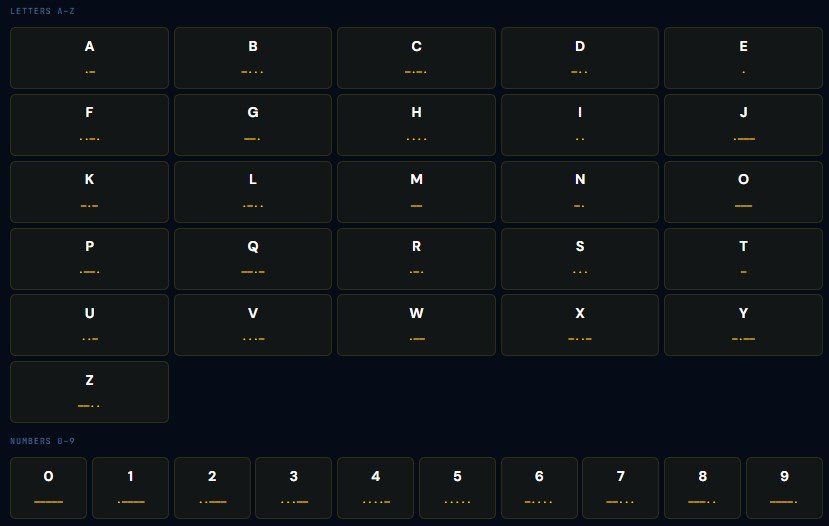
Practice tip: Start with E (·), T (—), A (·—), N (—·), I (··) — the five shortest Morse codes. Type each one into the light translator at slow speed and memorise what each flash pattern looks like visually before moving to longer characters.
Everything you need to know about visual Morse flashing, the tool features, and light-based Morse communication.
A Morse code light translator converts text into Morse code and displays it as blinking light flashes on screen — short flashes for dots and long flashes for dashes. It replicates how Morse code is transmitted by signal lamps, flashlights, lighthouse beacons, and naval flashing-light systems. This tool shows a circular light bulb that flashes each character in real time, with DOT and DASH indicator labels below it to identify each signal type.
In the light display, a dot (·) is a short, brief flash — the bulb lights up for 1 unit of time. A dash (—) is a longer, sustained flash — the bulb stays lit for 3 units of time (three times longer than a dot). The DOT and DASH indicator labels below the circular bulb also illuminate to confirm which signal type is currently being shown, making it easier to identify flash types when the speed is high.
The Speed slider sets the duration of each dot flash in milliseconds (ms). The default is 550ms. All other timing is calculated from this number — a dash lasts 3× the dot duration, letter gaps last 3×, and word gaps last 7×. Slide left (slower) to increase flash duration for easier visual analysis — ideal for beginners. Slide right (faster) to decrease duration and simulate real-world Morse transmission speeds for advanced learners.
Yes. Type SOS into the input box and press Play Morse. The tool flashes: three short pulses (S = · · ·), then three long pulses (O = — — —), then three short pulses (S = · · ·). This is the internationally recognised distress signal — the same pattern used by signal lamps and flashlights in real emergencies. Practise it at slow speed until you can identify it visually, then use the slider to practise at faster speeds.
Yes — this tool was specifically designed with visual-first Morse learning in mind. Sound is entirely optional. The complete Morse message is displayed through light flashes with no audio required at any point. Deaf and hard-of-hearing users can learn the entire Morse code alphabet, practise word and phrase recognition, and study ITU timing patterns entirely through the visual light display.
The Sound On toggle adds CW (Continuous Wave) audio beep tones that play in perfect synchronisation with each light flash. When Sound is On, you hear a short beep for every dot and a longer beep for every dash at the exact same moment the bulb flashes — creating a powerful dual audio-visual Morse signal. Click again to switch to Sound Off for completely silent, light-only playback — ideal for quiet environments, classrooms, or personal accessibility preference.
Light-based Morse code has been used in real-world communication for over 150 years. Naval signal lamps (Aldis lamps) transmit ship-to-ship messages in Morse during radio silence. Lighthouses use coded flash sequences to identify their location. Scouts and military use signal torches for field communication. Aviation uses Morse flashes in VOR and NDB beacon identification. Today it also remains an important emergency backup — any flashlight can transmit SOS in Morse code when other communication fails.
Yes — completely free. No account, no signup, no download, no usage limits. The full tool — including the circular light bulb display, DOT/DASH indicators, Play Morse, Stop, Sound toggle, and Speed slider — all run in your browser at no cost.
Enhance your learning experience by exploring additional tools available on InMorseCode, including:
Internal tools work together to build a complete Morse code learning ecosystem.