
Master the art and science of Continuous Wave (CW) communication with InMorseCode’s free, browser-based training suite.
InMorseCode offers three interconnected trainers, each designed for a specific phase of your Morse code journey. Together, they form a complete learning ecosystem.
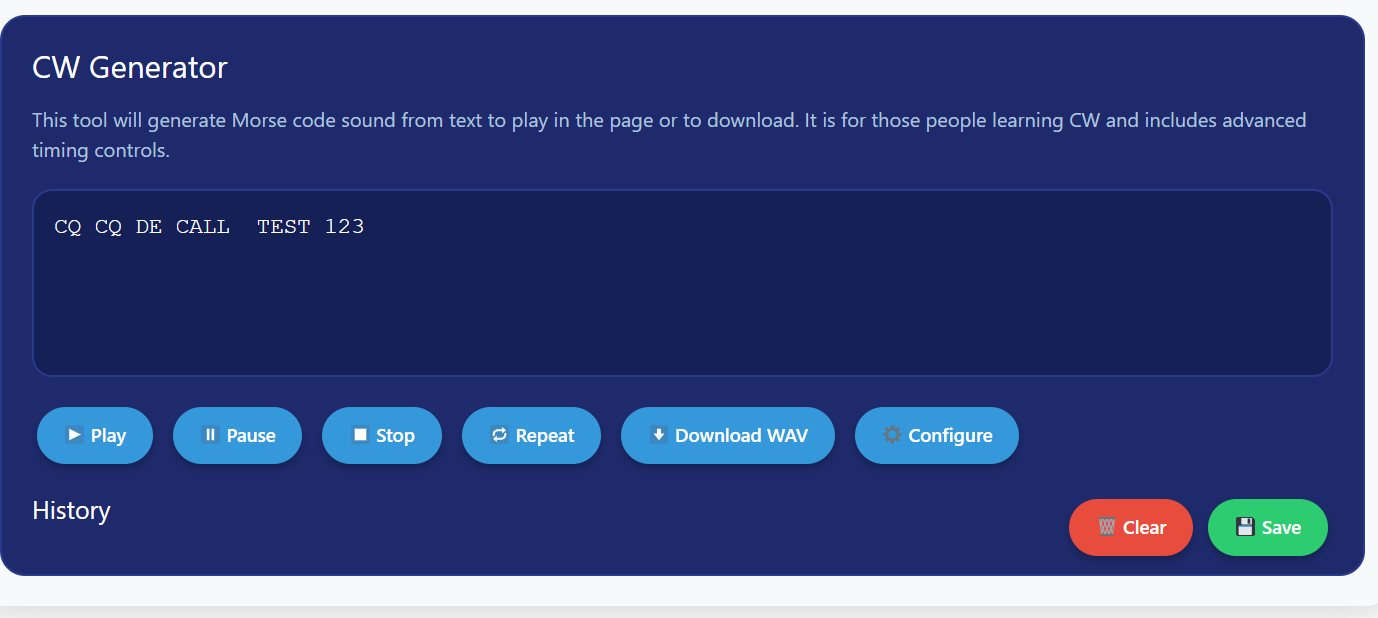
Custom message creation and precision audio export
The CW Generator is your tool for creating, analyzing, and exporting custom Morse code transmissions. It’s the most flexible of the three trainers, designed for operators who want complete control.
What makes it powerful:
Free-form text input with real-time syntax highlighting (prosigns appear highlighted, invalid characters flagged in red)
Independent dit and dah pitch controls Set different frequencies for dots versus dashes
Variable pitch option Simulates realistic on-air signal drift and QRM
Human timing mode Adds realistic jitter to simulate hand-sent code
Multi-medium output Sound, visual light box, and mobile vibration (haptic feedback)
Start-up delay compensation Critical for Bluetooth headphone users (prevents first-dit cutoff)
Word-level history playback Click any word from your history to practice just that word
Precision WAV export with customizable end-gap
When to use it:
Creating custom practice files for your specific callsign or contest exchange
Simulating real on-air conditions with variable pitch and human timing jitter
Testing your copying ability with unfamiliar message content
Exporting audio files for mobile practice during commutes
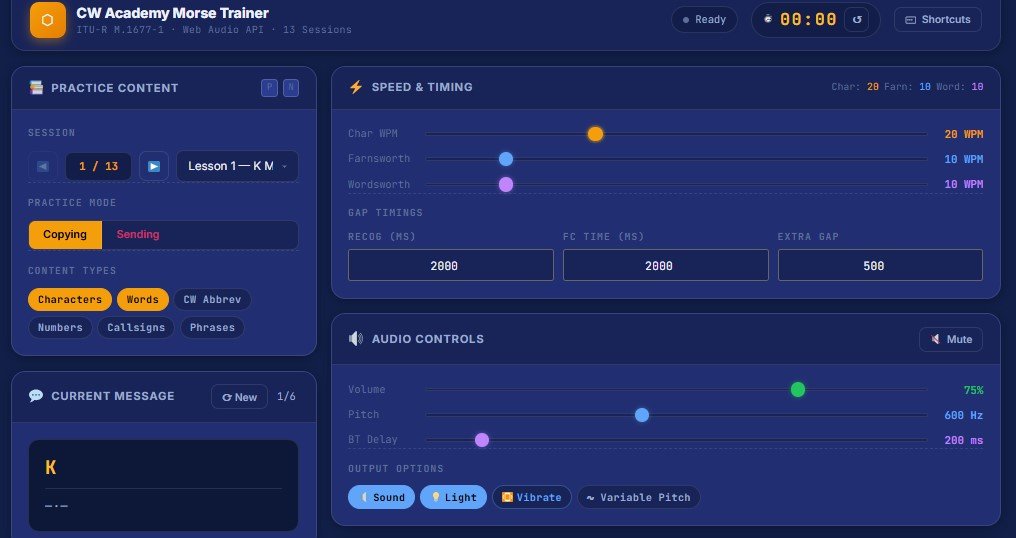
Structured curriculum with adaptive speed training
Once you understand timing fundamentals, the CW Academy Morse Trainer takes you through a complete 13-lesson curriculum following the proven Koch/Farnsworth methodology.
What makes it comprehensive:
13-lesson structured curriculum Lessons 1–7 introduce characters in optimal Koch order; Lessons 8–13 cover common words, numbers, punctuation, CW abbreviations, and callsigns
Independent speed controls Separate sliders for Character WPM, Farnsworth WPM, and Wordsworth WPM
Content filter system Isolate practice by characters, words, abbreviations, numbers, callsigns, or phrases
Sequence pipeline Customize your practice loop with 8 configurable steps (Show Before, Say Before, Morse, Recognition Gap, Show After, Say After, Morse Repeat, Bell)
Speed Racer adaptive algorithm Automatically ramps speed up or down across multiple repeats to break through plateaus
Full-screen flashcards with adjustable size and case options
Text-to-Speech integration for auditory word association
History logging with CSV export to track progress over weeks and months
WAV audio export for offline practice
When to use it:
As your daily driver for structured practice sessions (15–30 minutes recommended)
When following the 12-week Farnsworth progression schedule (detailed below)
For targeted drills filter to “Callsigns” only, or “CW Abbrev” only
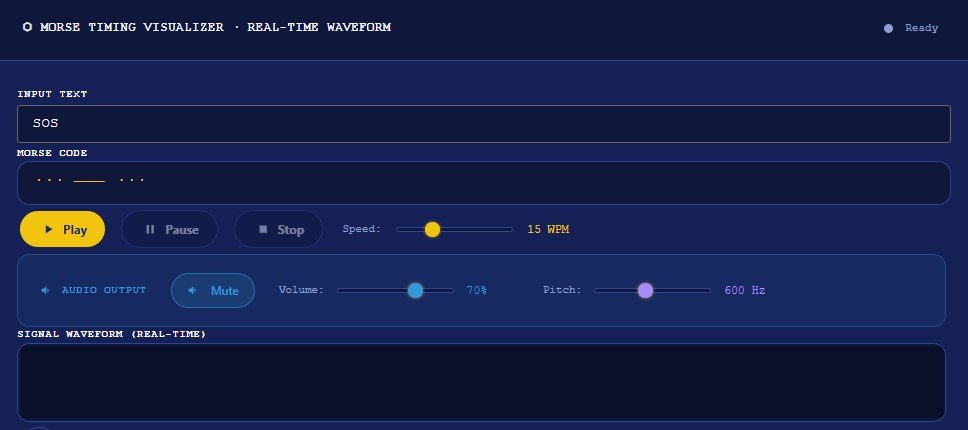
Master the fundamental rhythm and timing of Morse code
This is where every new operator should begin. The Farnsworth Timing Visualizer teaches you the six essential timing rules that govern all Morse code transmission, as defined by ITU-R M.1677-1.
What makes it essential:
Real-time waveform display showing exactly what properly-timed code looks like
Six live-updating timing chips displaying dot, dash, element gap, letter gap, and word gap durations in milliseconds
Adjustable WPM slider (5–40 WPM) with instant recalculation of all timing values
Visual lamp indicator synced perfectly with audio for multi-sensory learning
Comprehensive timing reference table showing all gap durations from 5–30 WPM
When to use it:
Before you even try to memorize letters spend 15 minutes just watching the waveform as it plays “PARIS” at different speeds
Whenever you hit a speed plateau return here to verify your spacing comprehension
When learning to send with a straight key use the waveform as your timing reference standard
Understanding timing is the single most important factor separating those who “know Morse code” from those who can actually use it on the air. This section explains the foundational principles that power all three of our trainers.
The International Telecommunication Union defines Morse code timing in its recommendation ITU-R M.1677-1. Every element every dot, every dash, every silence derives from a single base value called the unit.
The Core Formula:
1 unit (milliseconds) = 1200 ÷ WPM
This formula comes from the PARIS standard. The word “PARIS” contains exactly 50 timing units when transmitted with proper spacing. At precisely 1 WPM, PARIS takes 60 seconds to send. Therefore:
50 units = 60,000 milliseconds
1 unit = 1,200 milliseconds at 1 WPM
At any WPM: unit = 1200 ÷ WPM
| Element | Duration | At 20 WPM |
|---|---|---|
| Dot (dit) | 1 unit | 60 ms |
| Dash (dah) | 3 units | 180 ms |
| Gap between elements (within letter) | 1 unit | 60 ms |
| Gap between letters | 3 units | 180 ms |
| Gap between words | 7 units | 420 ms |
Critical observation: The gap between letters (3 units) is exactly the same duration as a dash. The gap between words (7 units) is more than double that. This is why incorrect spacing, the most common beginner mistake completely destroys readability.
Many self-taught operators start by learning at 5 WPM with uniform timing where dots, dashes, and gaps are all proportionally stretched. This approach has a fatal flaw: it trains analytical counting, not pattern recognition.
At 5 WPM:
Dot = 240 ms
Dash = 720 ms
The elements are so slow that you can consciously count “one… two… three…” for a dash. This feels comfortable, but it creates a speed ceiling around 10–13 WPM where counting becomes physically impossible.
The solution: Farnsworth timing.
Farnsworth timing (named after Donald R. “Russ” Farnsworth, W6TTB) separates what standard timing combines into a single WPM value:
Character Speed: The speed of dots and dashes within each letter. Kept high (typically 15–25 WPM) to preserve natural sound shape.
Effective Speed: The overall throughput when extended inter-character gaps are included. Kept lower (5–10 WPM initially) to give processing time.
Example: 20/5 Farnsworth Setting
Individual characters sound like they’re being sent at 20 WPM (fast, natural rhythm)
But the gaps between letters are extended so the overall message flows at 5 WPM
This forces your brain to recognize characters as complete auditory chunks, the same way you recognize spoken words without parsing individual phonemes. The extended gap simply gives you time to write down what your brain already recognized.
| Method | What It Addresses | Best Practice |
|---|---|---|
| Koch Method | Order of character introduction (start with 2 characters, add only when 90% accuracy achieved) | Use Koch’s sequence: K, M, R, S, U, A, P, T, L, O, W, I, N, E… |
| Farnsworth Timing | Speed and spacing of transmission | Use 20/5 starting ratio, gradually close the gap |
Modern training programs including our CW Academy Trainer implement both simultaneously: Koch’s character sequence delivered with Farnsworth timing.
The following tables show exact millisecond values for all timing elements across the full WPM spectrum. These values are calculated in real-time by all three of our trainers.
| WPM | Unit (ms) | Dot (ms) | Dash (ms) | Letter Gap (ms) | Word Gap (ms) |
|---|---|---|---|---|---|
| 5 | 240 | 240 | 720 | 720 | 1,680 |
| 8 | 150 | 150 | 450 | 450 | 1,050 |
| 10 | 120 | 120 | 360 | 360 | 840 |
| 13 | 92 | 92 | 277 | 277 | 646 |
| 15 | 80 | 80 | 240 | 240 | 560 |
| 18 | 67 | 67 | 200 | 200 | 467 |
| 20 | 60 | 60 | 180 | 180 | 420 |
| 23 | 52 | 52 | 157 | 157 | 365 |
| 25 | 48 | 48 | 144 | 144 | 336 |
| 28 | 43 | 43 | 129 | 129 | 300 |
| 30 | 40 | 40 | 120 | 120 | 280 |
| 35 | 34 | 34 | 103 | 103 | 240 |
| 40 | 30 | 30 | 90 | 90 | 210 |
| Character Speed | Effective Speed | Inter-Letter Gap | Inter-Word Gap | Skill Level |
|---|---|---|---|---|
| 20 WPM | 5 WPM | ~950 ms | ~2,200 ms | Absolute beginner |
| 20 WPM | 8 WPM | ~550 ms | ~1,280 ms | Early learner |
| 20 WPM | 12 WPM | ~270 ms | ~630 ms | Intermediate |
| 20 WPM | 17 WPM | ~100 ms | ~235 ms | Approaching standard |
| 20 WPM | 20 WPM | 180 ms | 420 ms | Full standard timing |
| 25 WPM | 25 WPM | 144 ms | 336 ms | Advanced |
| 30 WPM | 30 WPM | 120 ms | 280 ms | Contest-ready |
Our trainers engage multiple senses simultaneously, which research shows accelerates skill acquisition.
The Farnsworth Timing Visualizer and CW Academy Trainer both feature real-time waveform visualization.
What you see:
High position = Signal ON (dot or dash transmitting)
Low position = Signal OFF (gap occurring)
What you learn:
The width difference between dots (narrow) and dashes (wide)
The subtle difference between intra-character gaps (1 unit) and inter-letter gaps (3 units)
The notably wider inter-word gaps (7 units)
Many learners report their auditory recognition improves dramatically after just 10–15 minutes of watching the waveform while listening. The visual pattern reinforces the sound pattern in memory.
The lamp (present in all three trainers) provides a simple ON/OFF visual that updates in perfect sync with the audio. For many operators, this becomes a form of “visual copy”, you can almost “see” the code even without sound.
The CW Generator includes a vibration toggle. When enabled on supported mobile devices, your phone vibrates for the exact duration of each dot and dash.
Use case: Deaf and hard-of-hearing operators use vibration to learn and practice Morse code entirely through touch. It’s also useful for practicing discreetly in quiet environments.
The CW Academy Trainer includes full TTS support using your browser’s built-in speech synthesis.
Adjustable parameters:
Voice selection (all system voices available)
Speech rate (0.5× – 2.0×)
Pitch (0.0 – 2.0)
Punctuation speaking toggle
Use case: Hearing the word “Whiskey One Alpha Whiskey” spoken aloud while seeing the flashcard creates a powerful auditory-verbal association that complements the Morse sound pattern.
Both the CW Academy Trainer and CW Generator include one-click WAV audio export.
| Trainer | Export Content |
|---|---|
| CW Academy Trainer | The currently displayed message, rendered at current WPM settings |
| CW Generator | The entire input text, including prosigns, with full timing accuracy |
| Setting | Effect |
|---|---|
| Character WPM | Controls dot/dash speed |
| Farnsworth WPM | Controls inter-character spacing |
| Volume | Master output level |
| Pitch (or Dit/Dah Pitch) | Tone frequency |
| Variable Pitch | Random frequency variation (if enabled) |
| Start Delay | Buffer before first tone |
| End Gap | Silence appended to end of file |
Use Cases for Audio Export
Common questions about Morse code, the tools on this platform, language support, and how to get started.
Start with the Farnsworth Timing Visualizer. Spend 15 minutes just watching the waveform as it plays “PARIS” at different speeds. This builds an intuitive understanding of proper timing before you even try to learn letters. Then move to the CW Academy Trainer, Lesson 1.
The ARRL and CW Academy recommend starting with 20 WPM character speed and 5 WPM effective speed (the 20/5 Farnsworth setting). This forces pattern recognition from day one and prevents the “counting habit” that creates speed plateaus.
With consistent daily practice of 15–30 minutes using Farnsworth timing, most people reach 20 WPM within 6–12 months. Consistency matters far more than session length 15 minutes daily outperforms 2 hours once a week.
The trainers require an initial internet connection to load the page and fonts. Once loaded, all audio generation happens locally in your browser. You can export WAV files for true offline practice.
Farnsworth WPM: Controls the spacing between letters
Wordsworth WPM: Controls the spacing between words
In standard timing, both derive from the same base WPM. In Farnsworth timing, you can adjust them independently to create custom practice conditions.
No. The CW Academy methodology strongly recommends focusing on receiving (copying) first. Sending is a separate motor skill. Once you can copy comfortably at 10–13 WPM, then begin sending practice. This prevents you from developing bad sending habits based on incorrect timing perception.
In the CW Academy Trainer, use the Content Filter chips:
Disable Characters, Words, Abbrev, Phrases
Enable Numbers or Callsigns only
The message pool will now contain only your selected content type
In the CW Generator, simply type the callsigns or numbers you want to practice.