
Mastering Morse code isn’t just about memorizing dots and dashes, it’s about timing. If your spacing is off, even perfect characters become unreadable.
Master the timing technique used by amateur radio operators worldwide and practice it live with InMorseCode’s free Timing Visualizer.
| WPM | Unit ms | Dot ms | Dash ms | Ltr Gap ms | Wrd Gap ms |
|---|
Most beginners make the same mistake when learning Morse code: they focus entirely on memorizing which dots and dashes represent which letter. They drill the alphabet, learn the patterns, and then sit down at a radio only to discover they can’t copy anything at real speed.
The problem isn’t their memory. It’s timing.
Morse code isn’t a written language, it’s a rhythm. Every element, every dot, every dash, every silence between them, carries a precise duration measured in milliseconds. Change those durations and the meaning collapses. Understanding timing is the difference between someone who knows Morse code and someone who can use it.
That’s where Farnsworth Timing comes in. It’s the most effective learning technique in the amateur radio community, and once you understand why it works, you’ll never want to practice any other way.
Before we can understand Farnsworth timing, we need to understand the standard it builds on.
The International Telecommunication Union (ITU) defines Morse code timing in its standard ITU-R M.1677-1. The entire system is built around one concept: the unit. Every timing element, dots, dashes, gaps is expressed as a multiple of this single base unit.
Speed in Morse code is measured in words per minute (WPM). But how do you define a “word”? The ITU uses the word PARIS as the standard measuring unit. When sent at precisely 1 WPM, the word PARIS (including its trailing word gap) takes exactly 60 seconds to transmit.
Counting all the elements in PARIS gives us 50 units per word. This is why the standard timing formula is:
1 unit (in milliseconds) = 1200 ÷ WPM
At 20 WPM, one unit = 60 ms. At 5 WPM, one unit = 240 ms. Everything else scales from there.
| Element | Duration | At 20 WPM |
|---|---|---|
| Dot | 1 unit | 60 ms |
| Dash | 3 units | 180 ms |
| Gap between elements (same letter) | 1 unit | 60 ms |
| Gap between letters | 3 units | 180 ms |
| Gap between words | 7 units | 420 ms |
These six rules govern every transmission. Notice that the gap between letters (3 units) is exactly the same duration as a dash. And the gap between words (7 units) is more than double that. Proper spacing is as important as the elements themselves, in fact, incorrect spacing is the single biggest cause of miscopied Morse code.
| WPM | Unit (ms) | Dot (ms) | Dash (ms) | Letter Gap (ms) | Word Gap (ms) |
|---|---|---|---|---|---|
| 5 | 240 | 240 | 720 | 720 | 1,680 |
| 10 | 120 | 120 | 360 | 360 | 840 |
| 15 | 80 | 80 | 240 | 240 | 560 |
| 20 | 60 | 60 | 180 | 180 | 420 |
| 25 | 48 | 48 | 144 | 144 | 336 |
| 30 | 40 | 40 | 120 | 120 | 280 |
| 40 | 30 | 30 | 90 | 90 | 210 |
The InMorseCode Timing Visualizer calculates all of these values in real time as you move the WPM slider. The timing chips update instantly so you always know the exact millisecond durations for your current speed setting.
Farnsworth timing is a method of sending Morse code where the individual characters are transmitted at a relatively high speed, but the gaps between letters and words are extended far beyond the standard ITU spacing. The result is a transmission where the characters themselves sound “correct” but there is extra time between them to allow the listener to process what they just heard.
The technique is named after Donald R. “Russ” Farnsworth (W6TTB), an amateur radio operator who developed and popularized the approach. It is now the standard recommendation of the American Radio Relay League (ARRL) and is used by virtually every serious Morse code training program worldwide, including the Long Island CW Club (LICW) and the FISTS CW Club.
The Core Concept: Two Speeds in One
Farnsworth timing separates what standard timing treats as one number, your WPM into two distinct values:
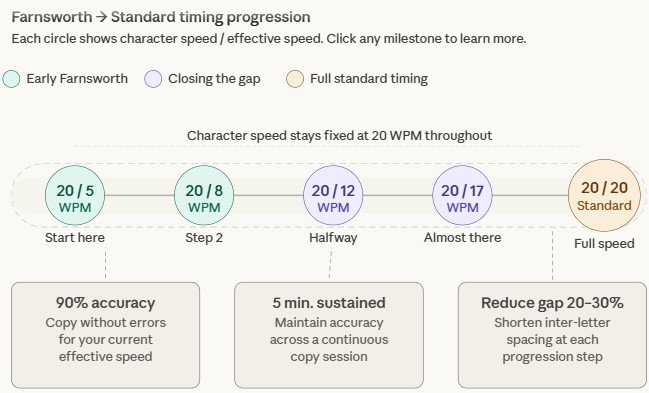
A common beginner Farnsworth setting is 20/5 characters sent at 20 WPM, with overall effective speed of 5 WPM. As skill develops, the effective speed increases until it matches the character speed, at which point the operator transitions to fully standard timing.
The human brain learns Morse code in two fundamentally different ways, and only one of them actually scales to operating speed.
Method 1 Analytical decoding: You hear a sound, mentally count “dot dash dot” and look up the letter R. This works at slow speeds (3–5 WPM) but completely breaks down as speed increases, because counting elements takes conscious attention and becomes impossible at 15+ WPM.
Method 2 Pattern recognition: You hear the characteristic dit-dah-dit sound pattern and your brain instantly recognizes R as a complete auditory chunk, the same way you recognize a spoken word without consciously parsing each phoneme.
The problem with sending code slowly (say, 5 WPM standard) to help beginners is that the individual elements are so spread out, analytical decoding actually becomes easier. Beginners learn to count. They get good at counting. Then when speed increases, they hit a wall because the skill they practiced counting doesn’t transfer.
Farnsworth timing forces pattern recognition from day one by keeping character speed high. At 20 WPM, the individual dots and dashes of a letter arrive so quickly that counting becomes impossible. The learner has no choice but to learn the character as a sound shape. The extended inter-character gap simply gives them time to write down what their brain already recognized before the next character arrives.
This is why operators trained with Farnsworth timing scale to higher speeds much more smoothly. They never developed the counting habit that needs to be unlearned.
Farnsworth timing works with how memory actually functions. When you’re a beginner, recognizing a Morse character requires active working memory. The extended gap between characters acts as a buffer zone, it gives your working memory time to process the just-received character and clear itself before the next one arrives.
As recognition becomes automatic (stored in long-term, procedural memory), the buffer is no longer needed. That’s when you shorten the gaps and close the distance between character speed and effective speed.
The InMorseCode Morse Code Timing Visualizer is a browser-based educational tool that converts any text to Morse code, plays it as audio, and displays precise visual timing feedback. Here is a complete explanation of every feature and how to use it for Farnsworth-informed practice.
The text input field accepts any combination of letters, numbers, and supported punctuation. As you type, the tool converts your input to Morse code in real time using the toMorse() function. The Morse display uses centered dots (·) for dits and em dashes (—) for dahs, visually cleaner and easier to read than the traditional period-and-hyphen notation.
Word boundaries are shown with a forward slash (/), making it easy to see where word gaps will occur in the transmission.
Recommended practice texts for beginners:
CQ CQ DE the universal calling sequence5NN TU standard contest exchangeQTH common Q-codePARIS PARIS PARIS the standard calibration wordThe WPM slider controls the playback speed and is the core control of the tool. It uses the standard formula 1200 ÷ WPM to calculate the base unit duration in milliseconds.
When you move the slider, the updateChips() function fires and instantly recalculates all six timing values displayed in the chips below the slider:
These chips update in real time as you drag the slider, so you can watch the relationship between WPM and millisecond durations directly. This is one of the most instructive features of the tool, you’ll quickly develop an intuitive sense for how timing scales with speed.
If playback is active when you change the WPM slider, the tool automatically applies the new speed to the ongoing transmission. This lets you hear the difference between speeds in real time.
Volume Slider: Controls playback level from 0–100%. Changes apply immediately, even mid-transmission. The volSlider handler passes the value directly to the audio gain node for seamless real-time adjustment.
Frequency Slider: Controls the pitch of the tone, ranging from 300 Hz to 1000 Hz. Most amateur radio receivers are optimized for sidetone around 600–700 Hz, which is also generally the most comfortable for extended listening. The freqSlider handler adjusts the Web Audio API oscillator frequency in real time.
Mute Button: Instantly silences audio output while preserving your volume setting. When you unmute, volume returns to exactly where you set it. This is useful if you want to watch the visual waveform without audio, or if you’re practicing in a shared space.
Play Button: Clicking Play triggers startPlayback(), which performs the following sequence:
buildQueue() to convert the Morse string into a precise millisecond-by-millisecond timelinestep() loop, which processes each timeline event sequentiallyThe buildQueue() function is where timing theory becomes practice. It walks through every character of your text, translates each Morse element (dot, dash, intra-character gap, inter-letter gap, inter-word gap) into a timed event with {on: true/false, ms: duration}, and adds it to the queue. The durations are calculated directly from the current WPM setting.
Pause Button: Calls pausePlayback(), which immediately clears the current timeout and halts the step loop. The button label changes to “Resume.” The signal lamp turns off and audio stops. Clicking Resume restarts the step loop from where it stopped.
Stop Button: Calls stopPlayback(), which clears all timeouts, turns off audio and lamp, resets the queue, and returns the UI to its idle state. Use Stop when you want to change your text or speed before starting again.
The waveform canvas is arguably the most educational part of the tool. The drawCanvas() function maintains a rolling 3.5-second history of the signal state and renders it as a continuous waveform:
By watching the waveform while the code plays, you can directly observe:
This visual feedback makes abstract timing ratios concrete and visible. At standard timing, a properly formed character shows clearly distinct dots versus dashes. Improper timing, a common problem with hand-sent code, shows up immediately as inconsistent widths.
For learners, the waveform is invaluable for understanding why spacing matters. Look for the letter gaps to be exactly as wide as a dash. Look for the word gap to be more than twice that. When you see these proportions in the waveform, you’re seeing correctly timed Morse code.
The lamp indicator at the top of the tool provides a simple ON/OFF visual representation of the signal state, controlled by setSignal(). When signal is ON, the lamp illuminates with a glow effect. When signal is OFF, it goes dark.
The lamp updates in perfect synchronization with the audio and waveform. For learners, this provides a third simultaneous channel of feedback, ideal for building the multi-sensory recognition that expert operators describe as hearing code “with your eyes.”
At the bottom of the tool, buildRefTable() generates a comprehensive timing reference covering WPM values from 5 to 30. The table shows all gap durations for each speed, calculated from the standard ITU formula.
Use this table to:
Set WPM to 20. Focus exclusively on the waveform. Before listening, just watch, observe how dot widths compare to dash widths, see the letter gaps versus word gaps. Then unmute and try to match what you hear to what you see.
At this stage, use single common letters: E (·), T (—), I (· ·), A (· —), N (— ·), M (— —). These cover the most common characters and give you contrast between simple and slightly more complex patterns.
Set WPM to 20 and mentally aim for an effective speed of 5 WPM by manually pausing between characters as you copy. Write down each character as soon as you hear it before the next one arrives without going back to correct. Speed of recognition matters more than accuracy at this point.
Add characters progressively in Koch order: after E and T, add the letters with the most acoustic contrast (S, O, R, etc.).
Work at 20–25 WPM standard speed. If accuracy drops below 80%, back down and rebuild. Use common amateur radio phrases (CQ, 73, QRZ) and your own callsign. Aim for groups of 5 random characters, the standard contest copy practice format.
Push character speed to 25–30 WPM while maintaining high accuracy. Use the waveform to audit your own keying if you have a practice key connected to an audio source. At this stage, the tool functions as a reference standard against which to compare your own timing.
Understanding how Farnsworth timing modifies standard ITU timing helps you use training tools including the InMorseCode Visualizer more effectively.
In standard ITU timing, all gaps are derived from the same unit value:
In Farnsworth timing, the intra-character timing (dots, dashes, and the gaps within a letter) uses the character speed unit. But the inter-letter and inter-word gaps are recalculated from the effective speed making them significantly longer.
The ARRL-recommended formula for calculating Farnsworth inter-character gap is:
T = (60/E - 37.2/C) / 19Where:
This ensures that a complete transmission at character speed C with the computed gaps T produces the desired effective speed E.
| Character Speed | Effective Speed | Inter-Letter Gap | Inter-Word Gap | Skill Level |
|---|---|---|---|---|
| 20 WPM | 5 WPM | ~950 ms | ~2,200 ms | Absolute beginner |
| 20 WPM | 8 WPM | ~550 ms | ~1,280 ms | Early learner |
| 20 WPM | 12 WPM | ~270 ms | ~630 ms | Intermediate |
| 20 WPM | 17 WPM | ~100 ms | ~235 ms | Approaching standard |
| 20 WPM | 20 WPM | 180 ms | 420 ms | Full standard timing |
| 25 WPM | 25 WPM | 144 ms | 336 ms | Advanced |
The Koch method (developed by German psychologist Ludwig Koch) teaches characters in a specific order, starting with just two characters and adding new ones only when accuracy exceeds 90%. Koch addresses the order of character introduction. Farnsworth addresses the timing of transmission.
These methods are not competing, they’re complementary. Most modern training programs use Koch’s character sequence with Farnsworth timing. Programs like G4FON’s Koch Trainer and Morse Runner implement both simultaneously.
Sending code slowly at a uniform speed (e.g., 5 WPM standard, where all elements including dots and dashes are stretched) remains the most common mistake in self-taught Morse code learners. As outlined above, this trains the wrong skill analytical counting and creates a speed ceiling that can take months or years of re-training to break.
The amateur radio community now almost universally recommends against slow uniform timing for learning purposes. If you’re below 15 WPM and learning, use Farnsworth.
There is no universal rule, but the ARRL and LICW both suggest transitioning when:
A practical transition ladder: 20/5 → 20/8 → 20/12 → 20/17 → 20/20 → 25/25. Each step closes the gap between character speed and effective speed until they match at which point you’re at full standard timing.
The FCC eliminated the Morse code requirement for amateur radio licensing in the United States in 2007. However, Morse code operation remains a core skill for General and Extra class operators who want to use the HF bands, where CW (continuous wave) contacts often reach signal levels too weak for voice operation.
Organizations like the ARRL and FISTS actively promote Morse code activity on the bands. The Long Island CW Club offers free training using Farnsworth timing specifically, and their methods have produced thousands of active CW operators in recent years.
Major amateur radio contests like CW Sweepstakes, CQ World Wide CW, and the ARRL DX CW contest operate entirely in Morse code. Top contest operators work at 30–40 WPM under high-pressure band conditions. Virtually all of them credit Farnsworth-style training in their development building character recognition first, then closing the gap to standard speed.
Morse code was the backbone of aviation and maritime communication for decades. While no longer required in commercial aviation (ILS/VOR station idents being the last active use), maritime distress signals in Morse code (the famous SOS: · · · — — — · · ·) remain part of maritime emergency training. Understanding proper Farnsworth-style learning helps emergency communicators maintain proficiency.
Unit: The fundamental time division in Morse code timing. All durations are multiples of this base value. Calculated as 1200 ÷ WPM in milliseconds.
Dit (Dot): The shorter of the two Morse code elements. Duration: 1 unit.
Dah (Dash): The longer of the two Morse code elements. Duration: 3 units.
Element gap: The silence between consecutive dits and dahs within a single letter. Duration: 1 unit.
Character gap / Letter gap: The silence between complete letters. Duration: 3 units. Equal to one dah in duration.
Word gap: The silence between complete words. Duration: 7 units.
PARIS standard: The basis for WPM calculation. The word PARIS takes exactly 50 units to transmit, establishing the relationship between unit duration and words per minute.
Character speed: In Farnsworth timing, the WPM value that governs dot and dash durations within letters. Kept high to preserve natural sound.
Effective speed: In Farnsworth timing, the overall throughput WPM when extended inter-character gaps are included. Kept lower than character speed during training.
WPM: Words per minute. The standard measure of Morse code transmission speed, calibrated to the PARIS standard.
ITU-R M.1677-1: The International Telecommunication Union standard that defines Morse code timing rules, element durations, and encoding.
Koch method: A character-introduction ordering system that starts with two characters and adds new ones only when accuracy exceeds 90%. Complements Farnsworth timing.
CW (Continuous Wave): The radio mode used for Morse code transmission. Named for the unmodulated carrier wave that is switched on and off to create Morse elements.
The InMorseCode Timing Visualizer uses the Web Audio API for audio generation and HTML5 Canvas for waveform rendering. All timing is calculated in JavaScript using setTimeout() for sequential event scheduling.
The core formula is unitFromWpm(wpm) = 1200 / wpm, which returns the unit duration in milliseconds. This value feeds into all six timing calculations that appear in the chips display.
Playback is built around a queue system. The buildQueue() function converts each Morse element into a discrete event object with {on: boolean, ms: duration}. The step() function processes one event, applies the signal state, and schedules the next step using setTimeout(step, current.ms). This produces accurate sequential timing without blocking the browser’s UI thread.
Audio is generated using a sine wave oscillator (the most natural-sounding waveform for Morse sidetone) connected through a gain node for volume control. Frequency can be adjusted from 300 to 1000 Hz to match operator preference and simulate different receiver filter characteristics.
The waveform canvas maintains a rolling 3.5-second history buffer. Each animation frame, drawCanvas() renders the buffer as a continuous line high when signal is ON, low when signal is OFF, providing an accurate real-time representation of the transmitted Morse code.
| Week | Character Speed | Effective Speed | Focus Characters | Session Length |
|---|---|---|---|---|
| 1–2 | 20 WPM | 5 WPM | E, T, A, N, I, M | 15 min/day |
| 3–4 | 20 WPM | 5 WPM | + S, O, R, H, D | 20 min/day |
| 5–6 | 20 WPM | 7 WPM | Full alphabet | 20 min/day |
| 7–8 | 20 WPM | 10 WPM | + Numbers 0–9 | 25 min/day |
| 9–10 | 20 WPM | 13 WPM | Common words | 25 min/day |
| 11–12 | 20 WPM | 17 WPM | QSO phrases | 30 min/day |
After week 12, the gap between character speed and effective speed is small enough that most operators can comfortably transition to full 20 WPM standard timing and begin pushing toward 25+ WPM.
Find answers to common questions about Morse code and how to use our tools effectively
Farnsworth timing is a learning technique where individual characters are sent at a higher WPM (so they sound natural) but the gaps between letters and words are extended. This forces learners to recognize characters by sound pattern rather than counting, which scales to higher speeds much better than slow uniform-speed training.
The ARRL and LICW recommend starting with a character speed of 15–20 WPM at an effective speed of 5 WPM. The 20/5 setting (20 WPM characters, 5 WPM effective) is the most common starting point.
Uneven timing is usually caused by inconsistent key pressure or poor keyer settings. Use the InMorseCode waveform display as your reference, your timing should look like clean, proportional rectangles. If dots and dashes are similar widths, your dashes are too short. If you see no clear difference between element gaps and letter gaps, your spacing is inconsistent.
Technically yes, but above 25 WPM the gaps become short enough that the distinction between character speed and effective speed shrinks significantly. Most operators who reach 25+ WPM character speed are approaching standard timing naturally. Farnsworth is primarily useful when character speed is at least 5–10 WPM higher than your comfortable effective speed.
With consistent daily practice (15–30 minutes per day) using Farnsworth timing, most people reach 20 WPM within 6–12 months. The wide variance depends on consistency, not aptitude. People who practice daily consistently outperform those with sporadic longer sessions.
Visual waveform feedback engages a different sensory channel than audio alone. Seeing the exact proportions of dots, dashes, and gaps makes the abstract ITU timing rules concrete and immediately understandable. Many learners report their auditory recognition improves after time spent watching the waveform, the visual pattern reinforces the sound pattern in memory.
In standard timing, a single WPM value determines all element durations. In Farnsworth timing, character-internal timing (dots, dashes, intra-character gaps) is set by a higher character speed, while inter-character and inter-word gaps are calculated from a lower effective speed. The result is code that sounds “fast” on each character but has extra breathing room between characters.
Farnsworth timing is primarily a training technique. In actual on-air operation, standard ITU timing is used. The goal of Farnsworth training is to accelerate proficiency so operators reach standard operating speeds faster and with better character recognition than slow-uniform-speed training produces.
Enhance your learning experience by exploring additional tools available on InMorseCode, including:
Internal tools work together to build a complete Morse code learning ecosystem.