
Upload any audio file MP3, WAV, OGG, or M4A and our intelligent audio-to-Morse-code decoder will automatically detect and translate the Morse signal into readable text. Whether you are a ham radio operator, a student, an emergency communication trainer, or a puzzle enthusiast, this free online tool decodes morse code from audio in seconds, right in your browser. No download, no registration, no hassle.
or click to browse
Supports: MP3, WAV, OGG, M4A, AAC (max 10MB)
Audio analysis results will appear here
Audio to Morse Code conversion is the process of analyzing an audio recording that contains Morse code signals the classic pattern of short beeps (dots/dits) and long beeps (dashes/dahs) and automatically translating those sounds into plain, readable text. This is the reverse of a Morse code audio generator: instead of producing sounds from text, you are extracting text from sounds.
Traditionally, trained radio operators would listen to Morse code audio and manually decode each character. Today, automated decoders use signal processing techniques including Fast Fourier Transform (FFT), frequency filtering, and volume threshold detection to identify the precise timing of each dot and dash and map them to the International Morse Code standard (ITU-R M.1677-1). Our tool performs this analysis entirely in your browser using the Web Audio API, so your files never leave your device.
Whether you are decoding a WAV file from a shortwave radio recording, extracting hidden Morse signals from an MP3, or analyzing Morse code audio for practice, this tool handles it all automatically.
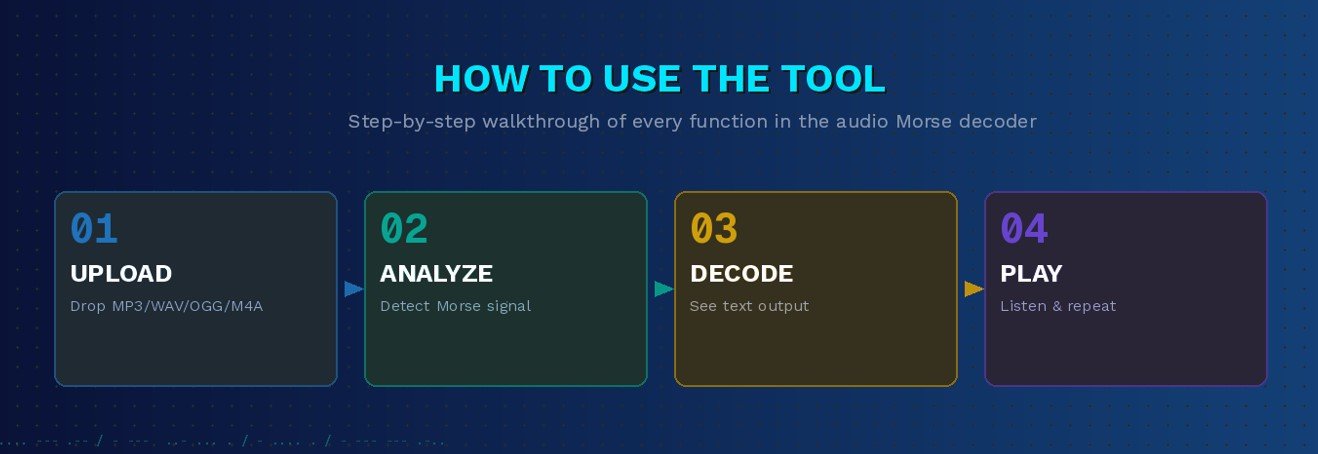
Our tool is designed to be incredibly simple to use, even if you have zero technical background. Here is a plain-language walkthrough of every function you see on the interface:
At the top of the tool, you will see an “Upload Audio File” panel with a dashed border. You can either drag and drop your audio file directly into this box, or click the blue “Browse Audio Files” button to open your device’s file picker. The tool supports the most common audio formats: MP3, WAV, OGG, and M4A, up to a maximum file size of 10 MB. Once you drop or select your file, it loads instantly no page refresh needed.
After your file is loaded, click the “Analyze Audio for Morse Code” button located just below the upload panel. This triggers the decoder engine, which scans your audio file using frequency analysis and signal processing to identify dot-and-dash patterns. Within moments, the decoded Morse code and its plain-text translation appear in the Morse Code Player section below. This is the core function of the tool everything else supports and enhances this detection.
The green “Play Morse” button lets you play back the decoded Morse code as audio so you can hear it clearly. This is especially useful for learners who want to train their ear to recognise the rhythm and timing of dots and dashes. You can press Play at any time to begin audio playback of the decoded signal.
The orange “Pause” button stops the audio playback mid-stream without resetting to the beginning. This is perfect when you want to review a specific section of the decoded Morse, jot down notes, or check the translation character by character. Click Play again to resume from exactly where you paused.
The red “Stop” button halts playback entirely and resets the player back to the beginning. Use Stop when you are done listening and want to restart from scratch, upload a different file, or switch output modes (Sound, Light, or Vibrate). After pressing Stop, the next Play will start from the very first character of the decoded Morse.
The white “Repeat” button enables looping mode, which means the decoded Morse audio will play over and over automatically without you needing to press Play again. This feature is invaluable for Morse code practice and learning continuous repetition is one of the most effective ways to train your ear to recognize patterns, characters, and common prosigns like CQ, SOS, and AR.
The teal “Sound” button toggles the audible audio output on or off. When Sound is active, you will hear the classic Morse code beeps at the frequency and volume you set. When Sound is off, the player can still cycle through the timing visually or via other output modes. This is useful in quiet environments where you want to experience Morse code silently using the Light or Vibrate modes.
The “Light” button activates a visual output mode where the decoded Morse code is displayed as flashing light pulses on your screen short flashes for dots and long flashes for dashes. This mimics real-world light-based Morse signaling, such as naval signal lamps or lighthouse communications. It is also an excellent accessibility feature for users who are hard of hearing and prefer a visual decoding experience.
The “Vibrate” button activates haptic feedback on supported mobile devices. Your phone or tablet will vibrate in the exact rhythm of the decoded Morse code short vibrations for dots, longer vibrations for dashes. This is a tactile decoding experience used historically by the visually impaired and is still relevant for mobile learning and silent communication practice.
The blue “Share” button lets you instantly share the decoded Morse code message or the generated audio output via a link. This is ideal for teachers sharing Morse exercises with students, ham radio enthusiasts exchanging messages, or escape room creators sending puzzle answers to players. Sharing works directly from the browser no account required.
The Speed slider, labeled in Words Per Minute (WPM), controls how fast the Morse code plays back during the Play/Repeat function. The default is 20 WPM. Drag the slider left to slow the Morse code down ideal for beginners just learning the alphabet. Drag it right to increase speed and challenge yourself, simulating real-world amateur radio transmission speeds which typically range from 5 WPM for beginners up to 30+ WPM for experienced CW (Continuous Wave) operators.
The Volume slider controls the loudness of the audio playback. The default is 80%. Simply drag it up or down to find a comfortable listening level. This works independently from your device’s system volume, giving you fine-grained control directly within the tool. Pair it with the Speed slider to create the perfect practice environment quiet and slow for study, louder and faster for performance testing.
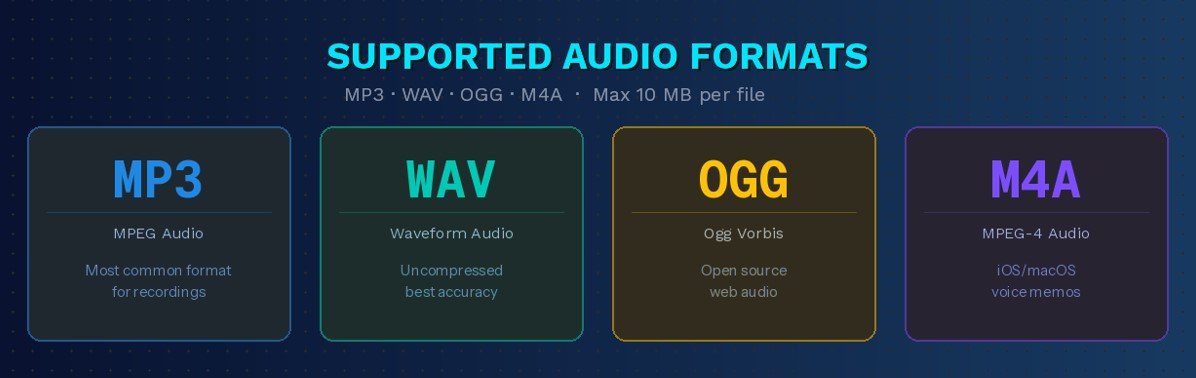
Our audio Morse code decoder accepts the following file types, making it compatible with virtually any recording device, radio software, or sound editor output:
| Format | Extension | Common Use Case | Max File Size |
|---|---|---|---|
| MPEG Audio Layer III | .mp3 | Compressed recordings, podcasts, radio archives | 10 MB |
| Waveform Audio | .wav | High-quality, uncompressed studio or SDR recordings | 10 MB |
| Ogg Vorbis | .ogg | Open-source audio, web applications | 10 MB |
| MPEG-4 Audio | .m4a | iOS/macOS recordings, voice memos | 10 MB |
The decoder engine analyzes audio in the 300–800 Hz frequency range, which covers the standard Morse code tone frequencies used in amateur radio, maritime communication, and aviation beacons. The default analysis frequency is 600 Hz, aligned with the ITU-R M.1677-1 standard for optimal detection accuracy.
This isn’t just a simple Morse code generator; it’s a complete audio analysis suite. We’ve packed it with features to help you learn, practice, and perfect your Morse code skills.
Upload MP3, WAV, OGG, or M4A files up to 10 MB. Compatible with recordings from SDR software, voice recorders, and iOS/Android devices.
Powered by the Web Audio API no server upload, no waiting. Your audio is processed entirely in your browser for maximum speed and privacy.
Experience decoded Morse through Sound (audible beeps), Light (visual flashes), and Vibrate (haptic pulses) simultaneously or independently.
Built on ITU-R M.1677-1 timing ratios for accurate decoding of real-world Morse signals from amateur radio, aviation, and maritime sources.
Fine-tune playback speed from 5 to 60 WPM and adjust volume independently. Ideal for both beginner learners and experienced CW operators.
Share decoded Morse messages and audio outputs instantly via link. No login required perfect for teachers, radio clubs, and puzzle creators.
Loop decoded Morse audio for uninterrupted practice. Continuous repetition is the fastest known method for building Morse code recognition skills.
No file is ever uploaded to a server. All audio processing happens locally in your browser. Your recordings remain completely private.
Fully responsive on desktop, tablet, and mobile. Vibrate mode even activates haptic feedback on supported smartphones.

Understanding the technology helps you get better results. Here is how our audio Morse code decoder works under the hood, explained simply:
When you upload your audio file, the browser’s Web Audio API loads the file into memory and decodes it into raw audio samples. The tool then applies a band-pass frequency filter centered around the expected Morse code tone frequency (default 600 Hz). This filter narrows down the audio to only the range where Morse beeps occur, significantly reducing background noise and improving detection accuracy.
The preprocessed audio is then analyzed using a Fast Fourier Transform (FFT), a mathematical process that breaks down the audio signal into its component frequencies. This allows the decoder to identify exactly when a tone is present (a dit or dah) and when there is silence (a gap between characters or words). The FFT runs in real time across the entire duration of the uploaded audio file.
The tool applies a volume threshold, a minimum signal strength to distinguish between an intentional Morse tone and background noise. Any tone above the threshold is counted as a signal; anything below is treated as silence. The duration of each signal is measured precisely and compared against the ITU timing ratios: a dot lasts 1 time unit, a dash lasts 3 time units, a character gap lasts 3 units, and a word gap lasts 7 units.
Once each dot, dash, and gap has been identified, the decoded sequence is mapped against the International Morse Code alphabet covering all 26 letters (A–Z), 10 digits (0–9), and standard punctuation including periods, commas, question marks, and prosigns like SOS, AR, SK, and BK. The result is displayed as plain, readable text in the Morse Code Player section.
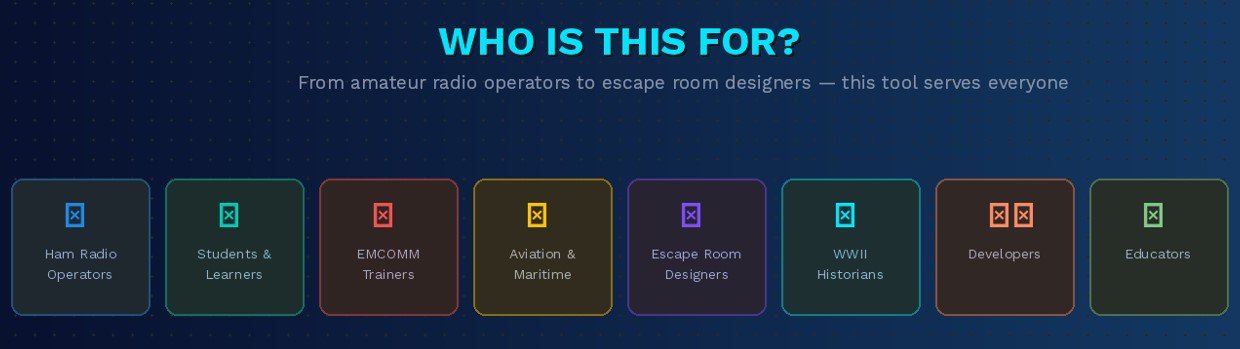
Our tool serves a wide range of users across education, communication, and recreation:
Morse code was developed in the early 1830s and 1840s by Samuel Morse and Alfred Vail as a method of transmitting textual information over telegraph wires using electrical pulses. Each letter, number, and punctuation mark is represented by a unique sequence of short signals (dots, or “dits”) and long signals (dashes, or “dahs”). The system proved so effective that it became the global standard for long-distance communication for over a century.
The International Morse Code, standardized by the International Telecommunication Union (ITU) as Recommendation M.1677-1, defines the dot-dash sequences for all 26 Latin letters, digits 0–9, and a set of procedural signs (prosigns) such as SOS (···−−−···), CQ (−·−· −−·−), and AR (·−·−·). This is distinct from the earlier American Morse Code, which used different patterns and has largely fallen out of use.
While telegraphy as a profession has become obsolete, Morse code remains relevant in several modern contexts. Amateur radio (ham radio) operators worldwide still communicate in Morse code, particularly at low power levels where CW transmissions cut through interference better than voice. Aviation uses Morse code to identify NDB navigation beacons. Emergency services include Morse code in survival training curricula. And modern culture has adopted Morse code in everything from jewelry and tattoos to military special operations signaling.
Learning to decode Morse code from audio the skill this tool automates is a foundational competency for any serious amateur radio operator and an achievable goal for any dedicated learner.

Accurate audio Morse decoding depends entirely on precise timing measurement. Our decoder applies these internationally standardized timing ratios to every audio file it analyzes:
| Signal Element | Duration (Time Units) | What It Represents |
|---|---|---|
| Dot (Dit) | 1 unit | Short beep — the basic unit of time |
| Dash (Dah) | 3 units | Long beep — three times a dot |
| Intra-character gap | 1 unit | Silence between dots/dashes within one letter |
| Inter-character gap | 3 units | Silence between two letters |
| Word gap | 7 units | Silence between two words |
At a speed of 20 WPM (the default setting in our player), each time unit is approximately 60 milliseconds. At 5 WPM for beginners, each dot lasts about 240 milliseconds. Expert operators running 30+ WPM bring dots down to 40 milliseconds, a rapid-fire rhythm that takes considerable training to recognize by ear.
To maximize decoding accuracy, follow these best practices when preparing your audio files for upload:
Use clean, single-channel recordings. Background noise, competing voices, and multiple simultaneous signals reduce detection accuracy. If possible, record Morse audio in a quiet environment or use a software-defined radio (SDR) with a narrow filter to isolate the Morse signal before saving.
Match the frequency filter to your recording. Most Morse code audio uses a tone between 400 Hz and 800 Hz. Our decoder defaults to 600 Hz. If your Morse tone is at a different frequency (many radios use 700 Hz or 800 Hz), ensure your audio contains a clear, consistent pitch.
Use WAV format for highest accuracy. WAV files are uncompressed, which preserves the exact amplitude envelope of each dot and dash. MP3 compression can slightly alter timing boundaries and may reduce detection precision for very fast Morse code (25+ WPM). For critical decoding tasks, record or export in WAV format.
Keep files under 10 MB. The tool processes up to 10 MB per file. For longer recordings, split them into segments using any free audio editor before uploading. Long files at high WPM speeds are processed equally well, but files near the size limit may take a moment longer to analyze.
Start with 20 WPM practice files. If you are using this tool to learn Morse code, begin with audio recorded at 20 WPM. Upload the file, read the decoded text, then use the Repeat button to listen again while following along. Gradually increase the WPM on practice files as your recognition speed improves.

Find answers to common questions about Morse code and how to use our Audio to Morse Code Tool effectively
Yes. Our audio to Morse code decoder is completely free to use with no sign-up, no subscription, and no usage limits. Simply upload your file and click Analyze.
The tool supports MP3, WAV, OGG, and M4A files up to 10 MB in size. WAV format is recommended for the highest detection accuracy due to its uncompressed nature.
The decoder applies a band-pass frequency filter and volume threshold to minimize the impact of background noise. Very noisy recordings may produce less accurate results. For best performance, pre-process noisy audio with a noise reduction tool before uploading.
The decoder can handle Morse code signals across a broad WPM range, from slow practice speeds (5 WPM) up to high-speed CW transmissions (50+ WPM), as long as the timing ratios in the audio conform to the ITU standard.
The current upload-based decoder works with audio files. Microphone (live audio) input capability is a feature planned for future updates on InMorseCode.com. Stay tuned for real-time audio Morse code decoding from microphone input.
No. All audio processing happens locally inside your browser using the Web Audio API. Your file is never uploaded to any server. Your data stays 100% private on your own device.
Yes. Simply upload your MP3 file using the Browse Audio Files button and click Analyze Audio for Morse Code. The tool will detect the Morse signal and display the decoded text output within seconds.
American Morse Code, used in early telegraph systems, had different dot-dash patterns and included some unique characters not found in the International standard. International Morse Code (ITU-R M.1677-1) is the modern, globally accepted standard used in amateur radio, aviation, and all current Morse applications. Our tool decodes International Morse Code.
CW stands for Continuous Wave — the term used in amateur radio for Morse code transmissions. A CW decoder is a tool that automatically interprets CW audio and converts it to text. Yes, our audio to Morse code decoder is a CW decoder that works directly in your browser.
Join thousands of students and hobbyists using our Audio to Morse Code Converter to learn and decode.