
Instantly convert any English text into Ubbi Dubbi, the classic PBS Zoom secret language game or decode Ubbi Dubbi back to plain English. Free, browser-based, no signup, no limits.
Ubbi Dubbi is a language game where "ub" is inserted before each vowel sound in each syllable. Try translating "hello" to "hubellubo"!
Your Ubbi Dubbi translation will appear here
Ubbi Dubbi is an English-based language game in which the syllable “ub” is inserted immediately before each vowel sound in every word. The consonants stay exactly where they are nothing is moved or rearranged. Only the vowel sounds receive the “ub” prefix, inserted syllable by syllable throughout the entire word.
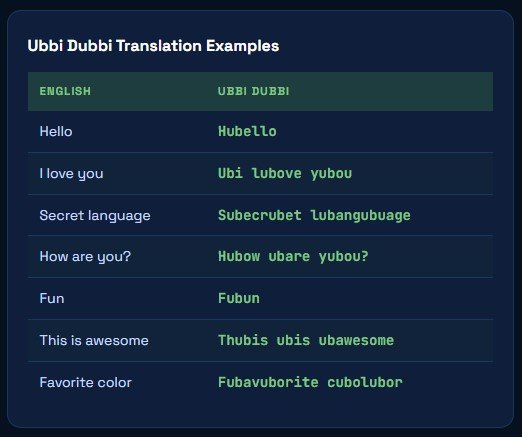
The rule is consistent and learnable: find each vowel sound, insert “ub” directly before it, leave everything else untouched. “Cat” (one vowel: a) becomes cubat. “Hello” (two vowels: e, o) becomes hubello. “Language” (three vowels: a, u, age) becomes lubangubuage. The result is a rapid, rhythmic form of English that sounds like nonsense to the uninitiated but is immediately recognizable once you know the system.
Ubbi Dubbi belongs to a family of English phonological language games that includes Pig Latin, Obbish (which uses “ob” instead of “ub”), and dozens of similar vowel-insertion or consonant-shifting games found across cultures. Unlike Pig Latin which moves consonants Ubbi Dubbi only adds. This makes the rule simpler to state but harder to execute at speed, since every vowel sound must be individually transformed in real time during spoken conversation.
The one rule: Insert “ub” before every vowel sound (not every vowel letter silent vowels are skipped). Consonants never move. Word structure stays intact.
Here is a plain-English explanation of every button, setting, and feature in the tool, based on exactly what you see on screen.
This is the main area where you type or paste the text you want to convert. You can enter any English sentence, word, or paragraph. At the bottom-left the character counter shows how many characters you have typed; the bottom-right shows the word count, both update live as you type. The box expands with your content and accepts any length of text.
The red ✕ Clear button (top-right corner of the input box) deletes all your typed text in a single click. It resets the character counter and word counter back to zero. Use it whenever you want to start a completely fresh translation without manually selecting and deleting your previous input.
The blue ✏️ Sample button (next to Clear) fills the input box with a pre-written example phrase so you can see the tool working immediately. This is perfect for first-time users who want to understand how the Ubbi Dubbi conversion looks before typing their own text. After clicking Sample, press Translate to Ubbi Dubbi to see the full result.
The large green ⇄ Translate to Ubbi Dubbi button is the primary conversion trigger. Once you have typed your English text and configured your settings, click this button to translate the entire input into Ubbi Dubbi. The output appears below the button instantly. This same button also works in reverse if your input is Ubbi Dubbi text, it will decode it back to plain English.
Under Translation Settings, the Vowel Pattern dropdown controls which syllable is inserted before each vowel sound. The default value is ub, the authentic Ubbi Dubbi pattern from PBS Zoom. Keep this set to ub (Ubbi Dubbi) for classic translation. Changing it to another pattern produces a variation of the same vowel-insertion game with a different sound prefix.
Example with “ub”: “cat” → cubat · “hello” → hubello · “language” → lubangubuage
The Case Handling dropdown controls how capital and lowercase letters appear in your translated output. Set to Preserve Original Case by default, meaning if your input starts with a capital letter, your Ubbi Dubbi output will also start with a capital. If you type “Hello”, you get “Hubello”, not “hubello”. This keeps translated text naturally formatted and ready to use in messages, documents, or social posts.
Below the Settings panel, four Quick Translate buttons give you instant pre-set phrases. Clicking any one of them loads the phrase into the input box and triggers translation immediately, no need to click the main Translate button separately. The four phrases available are:
At the bottom edge of the input box, two counters update in real time as you type. The character counter (bottom-left, shown as “0 characters”) tracks the total number of characters including spaces. The word counter (bottom-right, shown as “0 words”) tracks the total number of words. These are useful for managing the length of content you’re encoding: for example when preparing a puzzle clue, classroom exercise, or social media post with a specific length target.
Quickest workflow: Type text → click Translate to Ubbi Dubbi → copy result. Or click any Quick Translate button for an instant demo. Settings are optional, defaults are correct for classic Ubbi Dubbi.
Both are classic English schoolyard secret languages but they work in completely different ways. Here is a clear side-by-side comparison.
Rule: Insert “ub” before every vowel sound in every syllable.
Letters moved? No, only “ub” is added, nothing is relocated.
Example: “hello” → hubello | “cat” → cubat
Difficulty to speak: Harder, every individual vowel must be transformed.
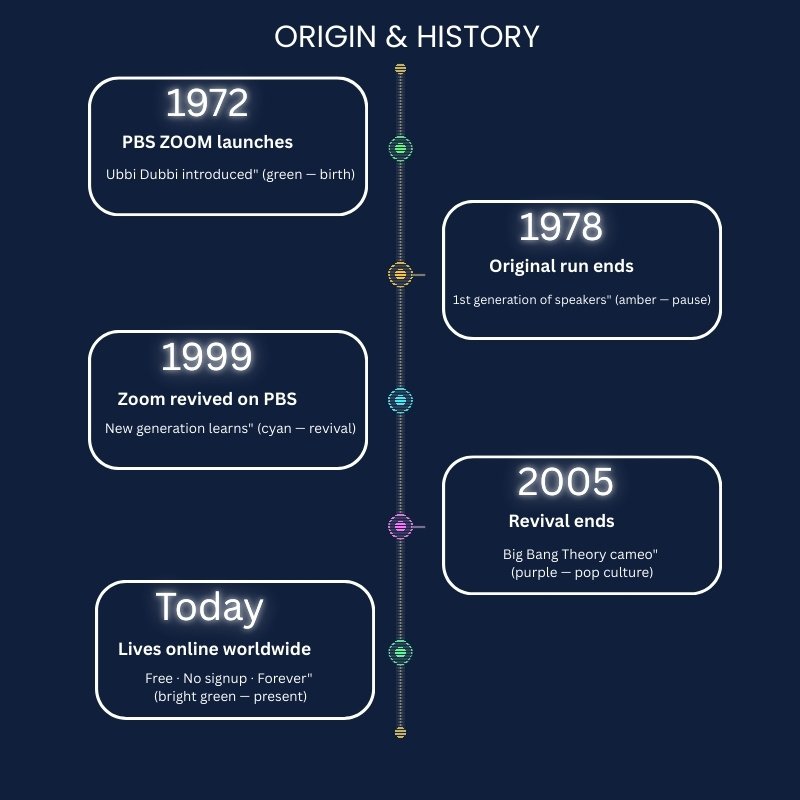
Famous from: PBS Zoom (1972–1978, 1999–2005), The Big Bang Theory
Rule: Move the first consonant cluster to the end, then add “-ay”.
Letters moved? Yes, consonants are relocated within the word.
Example: “hello” → ellohay | “cat” → atcay
Difficulty to speak: Easier, one transformation per word regardless of vowel count.
Famous from: General American schoolyard tradition since the early 20th century
From children playing language games to educators building phonics exercises, the Ubbi Dubbi translator serves a wide range of users.
The most natural audience children who want a fun secret language to share with friends. The Quick Translate buttons make it instant enough for any age. Share translated messages, challenge each other to decode phrases, and practice speaking Ubbi Dubbi out loud together.
Ubbi Dubbi is a proven phonics and phonological awareness exercise identifying vowel sounds to apply the “ub” prefix trains the same skills used in reading and spelling. Use this translator to generate Ubbi Dubbi worksheets, create classroom language challenges, or demonstrate vowel sounds to early readers.
Ubbi Dubbi makes a compelling puzzle mechanic because the rule is learnable but not immediately obvious. Encode a clue in Ubbi Dubbi and players must figure out the encoding system before decoding the message. Combine with Morse code or other cipher tools for multi-layer puzzles.
For anyone who grew up watching PBS Zoom, this translator lets you revisit the language, test how fluent you still are, share it with your own children, or decode messages you wrote decades ago. Many adults who learned Ubbi Dubbi as children in the 1970s retain surprising fluency.
Add Ubbi Dubbi dialogue to a character, create social posts your followers must decode, write party invitations in the secret language, or hide spoiler-free surprises in chats. The Case Handling setting preserves your formatting and the output is immediately copy-paste ready.
Ubbi Dubbi belongs to the broader family of phonological language games studied by linguists as windows into phonological processing and metalinguistic awareness. Alongside Pig Latin, Obbish, and Rövarspråket, it demonstrates how children internalize and manipulate the sound structure of language.
Ubbi Dubbi was popularized by Zoom, an American children’s television show produced by WGBH Boston and broadcast on PBS. The show aired in its original run from 1972 to 1978 and was successfully revived from 1999 to 2005. Zoom featured a rotating cast of children presenting viewer-submitted activities, science experiments, games, and performances. Ubbi Dubbi was one of its signature recurring segments viewers were explicitly taught how the language worked and then shown full conversations in Ubbi Dubbi, creating a generation of fluent speakers across America.
The language game belongs to a much older tradition of phonological language play. Ubbi Dubbi is closely related to Obbish which uses “ob” before each vowel sound instead of “ub” and shares structural DNA with Pig Latin, Pig Greek, and dozens of similar schoolyard secret languages found across cultures and historical periods. Linguists who study child language acquisition note that mastering games like Ubbi Dubbi demonstrates sophisticated phonological awareness, the same underlying skill that drives reading and spelling development in children.
The 1999 Zoom revival introduced Ubbi Dubbi to an entirely new generation, and the internet has since preserved and spread the language far beyond the PBS audience. YouTube tutorial videos, online translators, and community discussions have kept Ubbi Dubbi alive and discoverable for anyone who never watched the original show. It also gained renewed mainstream exposure from an episode of The Big Bang Theory in which characters use Ubbi Dubbi to hold a private conversation.
Unlike many childhood trends that fade with their decade, Ubbi Dubbi has proven remarkably durable. Adults who learned it in the 1970s retain the skill decades later, linguists note this as evidence of how deeply phonological pattern games embed in long-term memory. Today it appears in elementary school phonics exercises, creative writing classes, escape room puzzles, and party games worldwide.
Did you know? The name “Ubbi Dubbi” is itself written in Ubbi Dubbi, the “ub” insertions are applied to the name, making it a self-referential demonstration of the language game it describes.
Everything you need to know about the Ubbi Dubbi language and how the translator works.
Ubbi Dubbi is an English language game in which “ub” is inserted before every vowel sound in every word. “Hello” becomes hubello; “I love you” becomes Ubi lubove yubou. It was popularized by the 1972–1978 PBS children’s TV show Zoom and was revived again from 1999 to 2005.
Type or paste your English text into the input box, then click the green Translate to Ubbi Dubbi button. Your Ubbi Dubbi output appears instantly. You can also click any of the four Quick Translate buttons to see a sample phrase translated in one click, no typing required.
Yes, the translator works in both directions. Paste Ubbi Dubbi text into the input box and click Translate to decode it back to plain English. This is useful for decoding messages from friends, verifying your spoken Ubbi Dubbi, or working through cipher puzzles that use Ubbi Dubbi encoding.
No. Pig Latin moves the first consonant cluster to the end of the word and adds “-ay” so “cat” becomes “atcay”. Ubbi Dubbi only inserts “ub” before vowel sounds without moving anything “cat” becomes “cubat”. Both are English language games but use completely different rules. Ubbi Dubbi is generally harder to speak fluently because every vowel must be individually transformed.
The Vowel Pattern setting controls which syllable is inserted before each vowel sound during translation. The default is “ub” the authentic Ubbi Dubbi pattern. Keep it set to ub (Ubbi Dubbi) for classic results. Changing it produces variations of the same vowel-insertion game with a different prefix sound.
Yes, completely free. No account, no signup, no download, no usage limits. Everything runs entirely inside your browser. No text you enter is ever sent to a server or stored anywhere.
Obbish is a close relative of Ubbi Dubbi that uses “ob” instead of “ub” before each vowel sound. The rule is otherwise identical, insert the syllable before every vowel sound in every word. “Hello” in Obbish becomes “hobello” rather than “hubello”. Both belong to the same family of vowel-insertion language games. This translator uses the “ub” pattern by default but the Vowel Pattern setting may allow switching to other prefixes.